I originally planned to implement this with Next.js, but since this was my first time implementing OAuth2.0-based login and I was not very experienced with Next.js, I built it with Node.js + Express + React instead.
1. Spotify’s login flow
Spotify uses the OAuth2.0 framework.
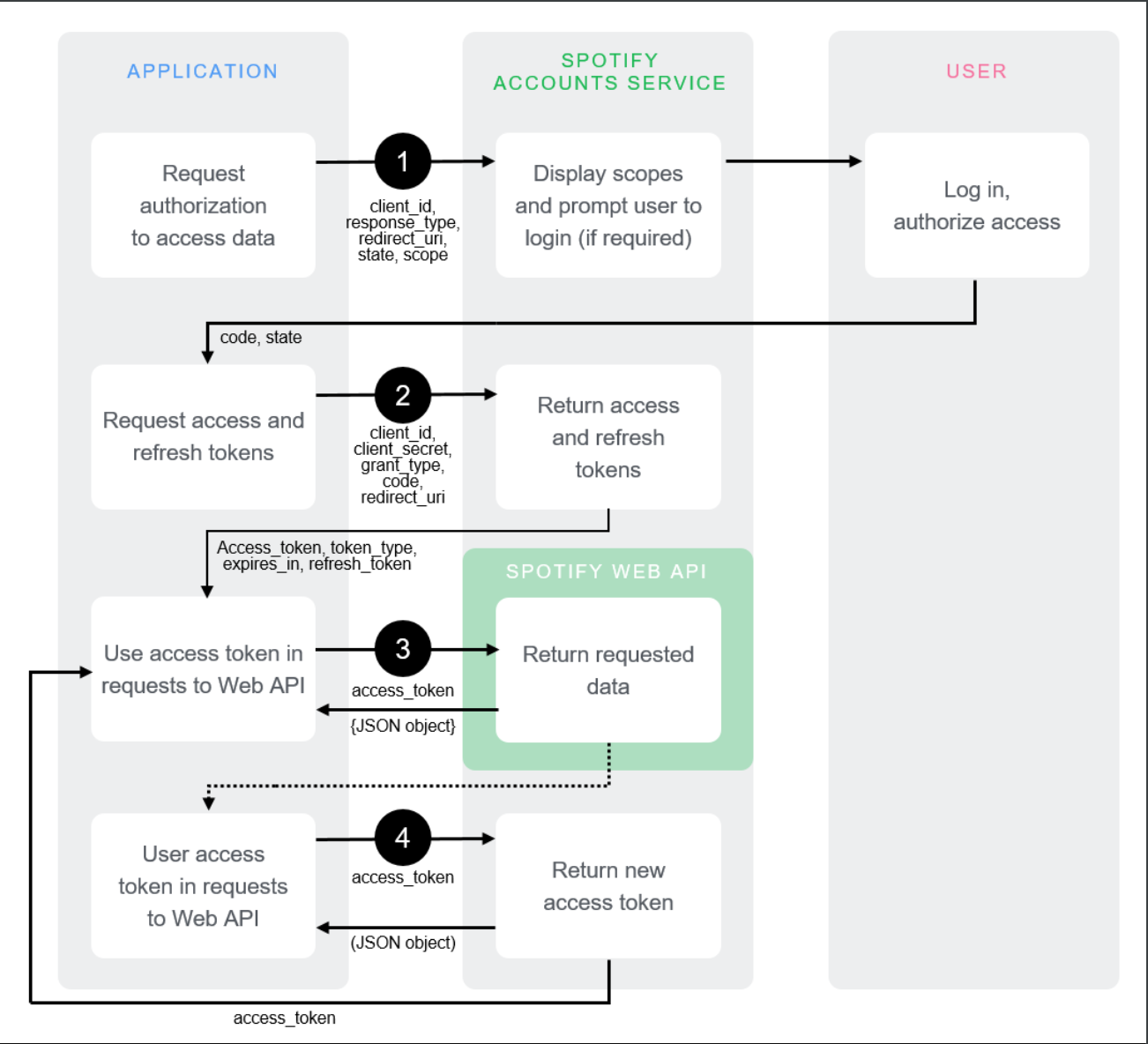 First, here is what we need to use the API:
code: Used to exchange for anaccess_tokenandrefresh_tokenaccess_token: The token required to retrieve the actual informationrefresh_token: Used to obtain a newaccess_tokenwhen it expiresclient_id: The identifier for the Spotify Developer app (issued to the developer)client_secret: The secret key for the Spotify Developer app (issued to the developer)
The flow is:
client_secret,client_id(issued from the Spotify Developer Dashboard)- Obtain a
code - Obtain an
access_tokenandrefresh_token - Use the
access_tokento access the API - When the
access_tokenexpires, use therefresh_tokento obtain a new one Then it repeats: 4 > 5 > 4 > 5 …
2. Spotify Developer Dashboard
Go to https://developer.spotify.com and log in.
Then click your name in the upper-right corner to go to the dashboard, and click the create app button.
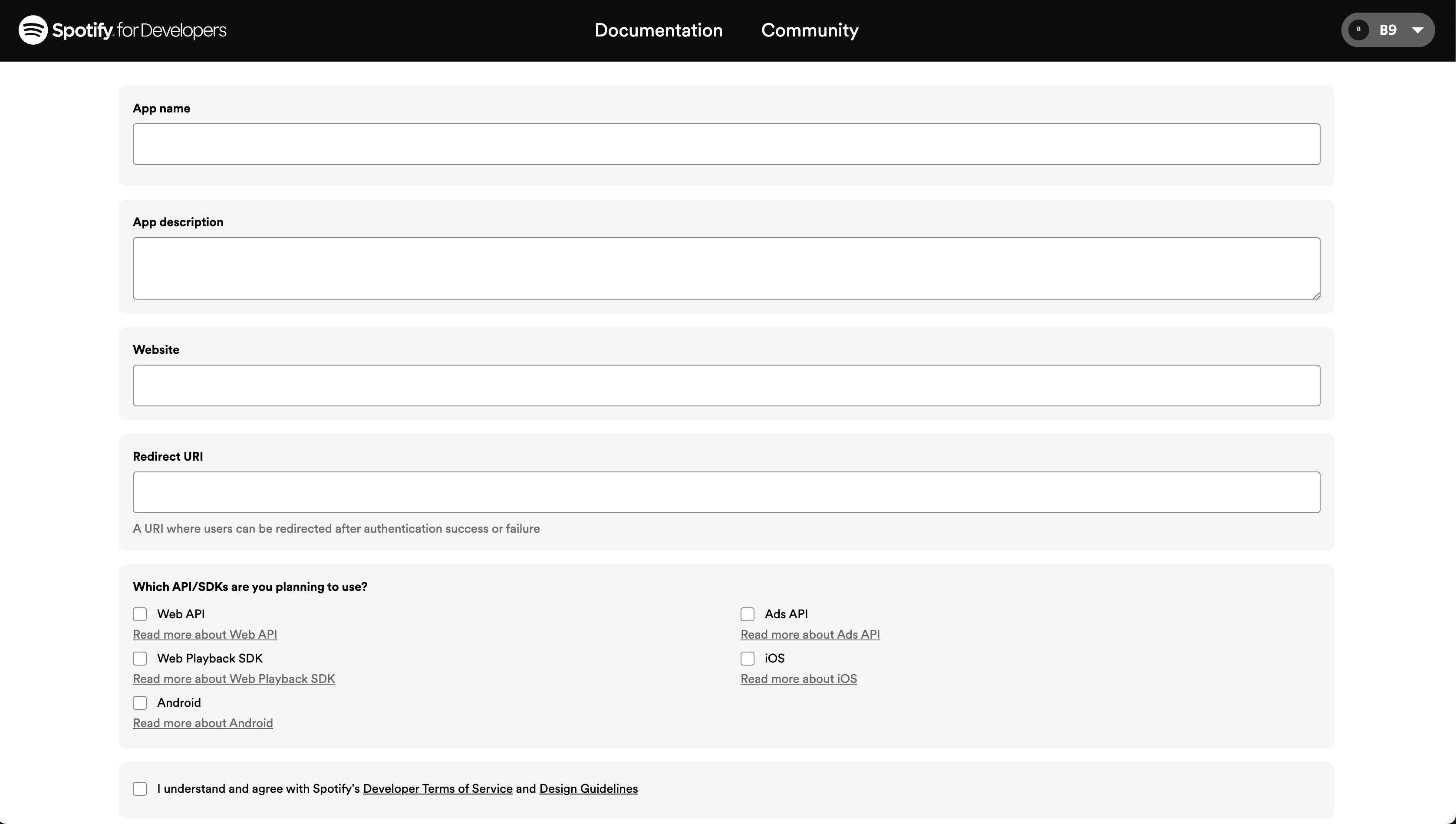
App name: The name of the app
App description: A description of the app (optional)
Website: The website address (optional)
Redirect URI: Required! The callback page to which the user is redirected when a code is issued. In a development environment, this is usually set to something like http://localhost:3000/callback.
Select the API you want to use. You can change this later.
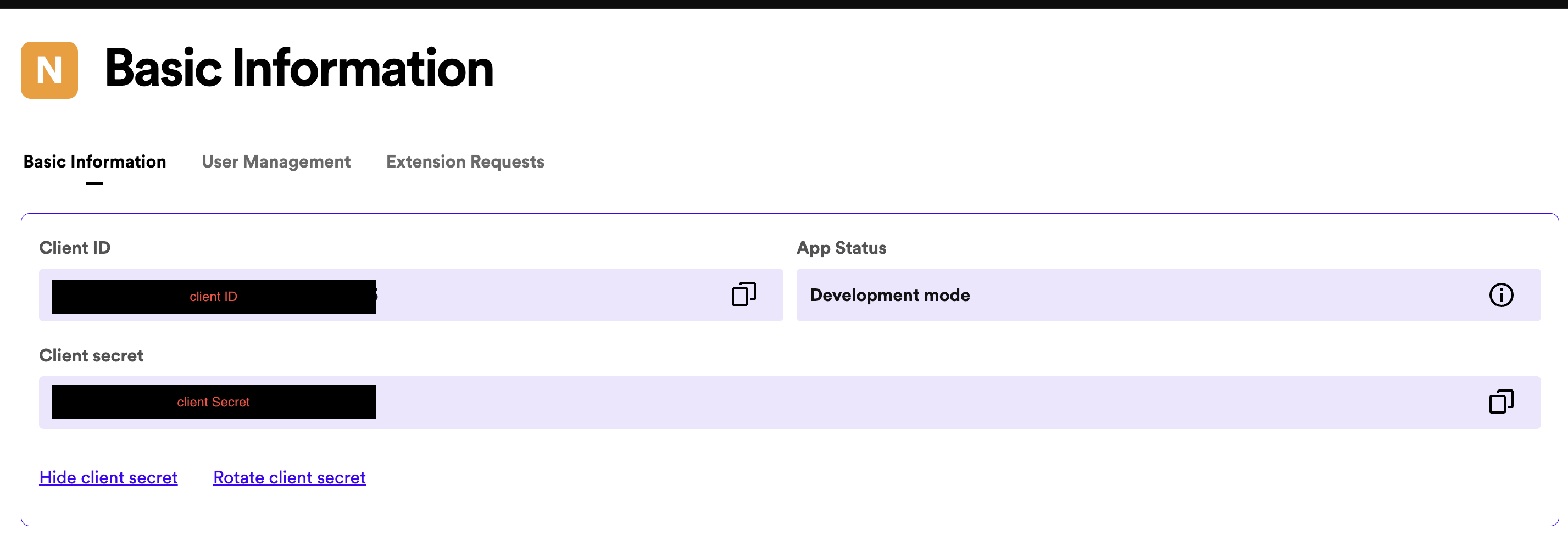
After that, click the app you created in the dashboard and open its settings to see the clientId and client secret.
3. Project setup
3-1. Express server
Let’s create a React app and set up an Express server inside it.
yarn create react-app appname
Then, in the React folder, install Express with
yarn add express
and create a folder called server, then create an Express server in index.js.
const express = require('express');
const path = require('path');
const app = express();

app.use(express.static(path.join(__dirname, '..', 'build')));
app.use(express.json());


app.get('/', function (req, res) {
  res.sendFile(path.join(__dirname, '..', 'build', 'index.html'));
});

app.listen(9000,() => {
  console.log('SERVER LISTENING ON 9000')
}) ;
app.get('/', function (req, res) {
  res.sendFile(path.join(__dirname, '..', 'build', 'index.html'));
});
This renders index.html from the build folder. Since the build folder doesn’t exist yet, build the app with the yarn build command.
Express runs on port 9000 and React runs on port 3000. But I want to manage them on a single port, so I’ll set up a React Proxy.
3-2. React Proxy
Official documentation
Create setUpProxy.js under the src/ path.
const { createProxyMiddleware } = require('http-proxy-middleware');


module.exports = function(app) {
  app.use(
    '/api',
    createProxyMiddleware({
      target: 'http://localhost:9000',
      changeOrigin: true,
    })
  )
}
I put the backend endpoints under the /api path, so I used /api; target is localhost:9000, the port Express runs on. Once the proxy is configured, a request made to React’s port (localhost:3000/api/~~~) is forwarded by the development server to the Express server on port 9000. The browser continues to use port 3000; the proxy forwards the API request behind the scenes, making it possible to work as if there were only one port.
4. Requesting a Spotify token
4-1. Obtain a code
The code-issuing flow works as follows: send a request to https://acounts.spotify.com/authorize with data in the query string. Spotify redirects to the Redirect_uri (callback page) configured in the dashboard, and the code is included in the redirected page’s query string.
| URL | mehtod | Required data |
|---|---|---|
| https://accounts.spotify.com/authorize | GET | response_type, client_id, scope, redirect_uri |
The URL takes this form:
https://accounts.spotify.com/authorize?response_type=code&client_id=$CLINET_ID&scope=${SCOPE}&redirect_uri=${REDIRECT_URI}
response_type: Enter code to receive a code.
client_id: The identifier issued in the Spotify dashboard
scope: The scope of accessible data depends on the scope. scope list
redirect_uri: The callback page address configured in the Spotify dashboard
Now let’s write the code.
- server/routes/api.js
const express = require('express');
const { SPOTIFY_CLIENT_ID, SCOPE, REDIRECT_URI } = require('../config');

const apiRouter = express.Router();


apiRouter.get('/login', (req, res) => {
  res.redirect(`https://accounts.spotify.com/authorize?response_type=code&client_id=${SPOTIFY_CLIENT_ID}&scope=${SCOPE}&redirect_uri=${REDIRECT_URI}`);
});
This file handles requests coming in on the /api path, so I set up a router.
I configured the required environment variables in config.js using dotenv and imported them.
When you enter the required data and make a request to this path, you are redirected to the configured redirect_uri. Looking at the address bar, it will have the form /callback?code=.....; the code can be retrieved from there.
http://localhost:3000/api/callback?code=AQAYxRYFF7hAkwLNG-Q3qUJ9K7Wew3Dk6NKr-6bwk0POYHiSQg2QQLpukCOM-uA2YCkysqv1I...
4-2. Issue a token
Now we need to issue a token using the code we received.
 Since the redirect goes to the
 redirect_uri configured in your Spotify dashboard, create the matching endpoint. In my case, it was api/callback.
- src/routes/api.js
apiRouter.get('/callback', (req, res) => {
  const searchParams = new URLSearchParams(req.query);
  const code = searchParams.get('code');

  const tokenResponse = await getSpotifyRefreshToken(code);// Store the returned Spotify token in tokenResponse

  if (tokenResponse) { // Save the token in a cookie if tokenResponse has a value
    res.cookie('refresh_token', tokenResponse.refresh_token, {
      httpOnly: true,
    })

  }
  res.redirect('http://localhost:3000'); // Redirect to the home page
});
First, retrieve the code value from the address bar and pass it as an argument to the function that exchanges it for a token.
| URL | method | header | Required data |
|---|---|---|---|
| https://accounts.spotify.com/api/token | POST | Content-Type: application/x-www-url-encoded, Authorization: Basic ${basicToken} | grant_type, redirect_uri, code |
grant_type: The authorization type. It isauthorization_code.redirect_uri: The callback page configured in the Spotify dashboard.basicToken:client_id : client_secretencoded using base64.code: The code issued in the previous step.lib/spotify.js
async function getSpotifyRefreshToken(code) {
  const searchParams = new URLSearchParams();
  searchParams.append('grant_type', 'authorization_code');
  searchParams.append('redirect_uri', REDIRECT_URI);
  searchParams.append('code', code);

 const basicToken = new Buffer.from(SPOTIFY_CLIENT_ID + ':' + SPOTIFY_CLIENT_SECRET).toString('base64');

  try {
   const response = await axios.post(SPOTIFY_TOKEN_ENDPOINT, searchParams, {
      headers: {
        'Content-Type': 'application/x-www-form-urlencoded',
        'Authorization': `Basic ${basicToken}`,
      },
    });

    return response.data;
  } catch (err) {
    console.error(err);
  }
  return null;
}
Put the required data into a URLSearchParams object.
basicToken is client_id : client_secret encoded using base64.
Using axios, make a request to the Spotify token endpoint, https://accounts.spotify.com/api/token, with the data using the POST method.
The response is returned as JSON in this form:
{
"access_token":"BQD-8jTKGyYS7W-LfaMvwj_vgGxRoFiWtVKfwZPovf15_tjYbOXGF9sg_p9KS1VRNIqeox2TpiiFAhncntC...."
,"token_type":"Bearer"
,"expires_in":3600,
"refresh_token":"AQCIF3IBVLc_R560C-sB_YtOfophiZjrw...",
"scope":"user-top-read"
}
Looking back at the api/callback code:
const tokenResponse = await getSpotifyRefreshToken(code);
if (tokenResponse) { // Save the token in a cookie if tokenResponse has a value
    res.cookie('refresh_token', tokenResponse.refresh_token, {
      httpOnly: true,
    })
We put the refresh_token value from the returned response into a cookie. When the home page is accessed, we check whether the cookie contains a refresh_token; I saved it in a cookie so that we can render the data if it exists, or render a login button if it doesn’t.
Now the flow is complete:
/api/loginrequest > Spotify login page >/api/callback(issue token, then save it in a cookie) > redirect to home page
Visit /api/login, log in to Spotify, and check the Application tab in the developer tools:

You can see that the cookie has been saved.
Now we can use this token to retrieve actual Spotify user data and display it on the screen.
5. Request user information through the API
We have received the token and saved it in a cookie. What I want to do is:
- Automatically check the cookie token when the home page is accessed
- If a token exists, render the user’s most-played tracks from the last 6 months
- Otherwise, render a login button
The refresh_token configured by the backend is set to httponly, so its value cannot be viewed in the browser. Therefore, I’ll create a backend endpoint that checks the cookie value and uses it to request user information.
5-1. Backend endpoint to check the token
- server/api.js
apiRouter.get('/token', async (req, res) => {
    const refreshToken = req.cookies.refresh_token; // Token value stored in the cookie

    const tokenResponse = await getSpotifyAccessTokenByRefreshToken(refreshToken);
    // Issue an access token based on the refresh token

    if(tokenResponse) {
    // Fetch the user's profile and top tracks using the access token
      const topTrackData = await getTopTrackData(tokenResponse);
      const userData = await getUsersProfile(tokenResponse);
      res.status(200).json({topTrackData: topTrackData, userData: userData});
      // Respond with JSON containing the data
    }
});
In the browser, use useEffect to request api/token on the first render. The next action is determined by the token value in the cookie.
Now let’s write these three functions:
getSpotifyAccessTokenByRefreshToken(): Issue an access_token using the refresh_token saved in the cookie
getTopTrackData(): Request the user’s top-track data using the issued access_token
getUsersProfile(): Request the user’s profile data using the issued access_token
5-2. Data request functions
- server/lib/spotify.js
Issue an access_token
async function getSpotifyAccessTokenByRefreshToken(refreshToken) {
  const searchParams = new URLSearchParams();
  searchParams.append('grant_type', 'refresh_token');
  searchParams.append('refresh_token', refreshToken);
  searchParams.append('client_id', SPOTIFY_CLIENT_ID);
  const basicToken = new Buffer.from(SPOTIFY_CLIENT_ID + ':' + SPOTIFY_CLIENT_SECRET).toString('base64');

  try {
    const response = await axios.post(SPOTIFY_TOKEN_ENDPOINT, searchParams, {
      headers: {
        'Content-Type': 'application/x-www-form-urlencoded',
        'Authorization': `Basic ${basicToken}`,
      },
    });

    return response.data.access_token;
  } catch (err) {
    console.error(err);
  }
  return null;
}
| URL | method | headers | Required data |
|---|---|---|---|
| https://accounts.spotify.com/api/token | POST | Content-Type: application/x-www-form-urlencoded, Authorization : Basic ${basicToken} | grant_type, refresh_token, client_id |
grant_type: ‘refresh_token’
refresh_token: The value of refresh_token stored in the cookie
client_id: The identifier issued by the Spotify dashboard
Put the required data into a URLSearchParams object and make a POST request through axios.
After the request, return access_token from the response JSON object.
Request the user’s top track data
async function getTopTrackData(accessToken) {
  try {
     const response = await axios.get(SPOTIFY_TOP_TRACK_ENDPOINT, {
            headers: {
                'Authorization': `Bearer ${accessToken}`
            }
        })
    return response.data;
  } catch (err) {
    console.error(err);
  }
  return null;
}
| URL | method | headers | Required data |
|---|---|---|---|
| https://api.spotify.com/v1/me/top/tracks | GET | Authorization: Bearer ${access_token} | - |
This function retrieves the user’s most-listened-to tracks. Unlike the earlier token-issuing process, it’s straightforward.
The JSON returned by TopTrackData contains a great deal of data. Since the client will choose what to use, we return response.data.
Request the user’s profile data
async function getUsersProfile(accessToken) {
  try {
     const response = await axios.get(SPOTIFY_USER_DATA_ENDPOINT, {
            headers: {
                'Authorization': `Bearer ${accessToken}`
            }
        })
    return response.data;
  } catch (err) {
    console.error(err);
  }
  return null;
}
| URL | method | headers | Required data |
|---|---|---|---|
| https://api.spotify.com/v1/me/ | GET | Authorization: Bearer ${access_token} | - |
The only difference from the user’s top-track data request is the URL. This also responds with a JSON object, so we return response.data. |
6. Receive the data on the frontend
The backend work is done. All that’s left is to display the data on the frontend.
6-1. Fetch the data
- src/App.js
  const [token, setToken] = useState(false);
  const [topTrackData, setTopTrackData] = useState([]);
  const [userData, setUserData] = useState('');
- [token, setToken]: A boolean used for conditional rendering based on whether a token exists
- [topTrackData, setTopTrackData]: A variable for storing the top-track data; its value is an array
- [userData, setUserData]: A variable for storing the user profile data. Since we’ll only use the user’s name, its value is a string
  useEffect(() => {
    async function fetchToken() {
      try{
        // Check the token stored in the cookie and fetch the data
        const response = await axios.get('/api/token');
        if (response) {
          setToken(true);
          setUserData(response.data.userData.display_name);
          setTopTrackData(response.data.topTrackData.items);
        }
      } catch (err) {
        console.error('Error fetching token :', err);
      }
    }
    fetchToken();
  }, [])
Now that we’ve created the variables that will store the values, write an async function inside useEffect.
- On the first render, request
/api/tokento check the cookie’s token value.
- On the first render, request
- As written above,
/api/tokenretrieves the actual data.
- As written above,
- Store the result of the request in
response.
- Store the result of the request in
- Follow the
ifstatement depending on whetherresponsehas a value. - Assign
truetotoken. 2. Assign the value with thedisplay_namekey from the fetched user profile data touserData. 3. Assign theitems(array) from the fetched top-track data totopTrackData.
- Follow the
- If
responsehas no value, print an error.
- If
6-2. Render the fetched data
The data is ready. Now let’s render it in the return statement.
return (
  <div className="App">
    {token ? ( // When token is true
      <>
        <h3>{userData}'s Top Track for last 6 months</h3>
        <div>
            <TrackList topTrackData={topTrackData} />
        </div>
      </>
    ) : ( // When token is false
      <button onClick={() => window.location.href='/api/login'}>Login to Spotify</button>
    )}
  </div>
);
token becomes true when a response is received from /api/token. In other words, it is false before logging in. So we use a ternary operator for conditional rendering:
- When
tokenistrue, show the data. - When
tokenisfalse, show the login button.
The user’s name is already assigned from response.data.display_name, so the user’s name will appear directly.
The number of user top tracks depends on the configured conditions, but by default it shows the 20 tracks from the last 6 months, in order. Let’s create a TrackList component and pass topTrackData to it as props.
- src/components/TrackList.jsx
function TrackList({ topTrackData }) {
  return (
  <div>
      {topTrackData.map((track, index) => (
      <div key={index}>
          <h3>{track.album.name}</h3>
          <h3>{track.album.artists[0].name}</h3>
          <img src={track.album.images[1].url} alt={'artist image'}/>
        </div>
      ))}
    </div>
  )
}

export default TrackList;
The topTrackData received from Spotify is returned as an array. Use .map to render each item in order.
They are the album name, artist name, and album image, respectively.
There may be one artist or several, so the artist information is contained in an array called artists. Let’s use another .map to display them all.
return (
  <div>
      {topTrackData.map((track, index) => (
      <div key={index}>
          <h3>{track.album.name}</h3>
          {track.album.artists.map((artist, index, arr) => (
          <span>{artist.name} {index < arr.length -1 && ' ,'}</span>
          ))}
          <div></div>
          <img src={track.album.images[1].url} alt={'artist image'}/>
        </div>
      ))}
    </div>
  )
As mentioned above, track.album.artists is an array. Use .map to iterate over the artists array and display all the artists. If there is more than one, {index < arr.length -1} checks whether the current artist is not the last in the array; the && operator adds , when the condition is true.
I added an empty <div>, a block element, to create a line break.
7. Check the result
 This uses the Spotify API to retrieve and display the user’s most-listened-to recent songs and the name from their user profile. I’ll end the post here. I plan to keep improving it, so if you followed along and ran into problems or want to see the code, check the GitHub link. Thank you.