Recently, I’ve been studying Go to build a custom exporter for my company’s service application.
I tried connecting to a database and inserting data with GORM, the Go ecosystem’s ORM.
1. Setup
1-1. Set up Go
go mod init // Initialize the project
go get -u gorm.io/gorm // Download the GORM package
go get -u gorm.io/driver/mysql // Download the MySQL driver
1-2. Run MariaDB with Docker
docker run -d -p 3306:3306 --name maria \
-e MYSQL_ALLOW_EMPTY_PASSWORD=true mariadb:10.9
2. Connect to the database
Now let’s connect GORM to the database.
- Create a database
create database test;
package main

import (
	"fmt"
	"log"

	"gorm.io/driver/mysql"
	"gorm.io/gorm"
)


func main() {
	dsn := "root@tcp(127.0.0.1:3306)/test"

	db, err := gorm.Open(mysql.Open(dsn), &gorm.Config{})

	if err != nil {
		log.Fatalf("Error opening GORM connection %v", err)
	}

	fmt.Println("Successfully connected GORM : ", db)
}
This code doesn’t need much explanation, so I’ll run it right away.

Now I’ll create a user table in MariaDB.
CREATE TABLE user (
    id INT AUTO_INCREMENT PRIMARY KEY,
    name VARCHAR(100) NOT NULL,
    email VARCHAR(100) NOT NULL UNIQUE,
    age INT,
    created_at TIMESTAMP DEFAULT CURRENT_TIMESTAMP,
    updated_at TIMESTAMP DEFAULT CURRENT_TIMESTAMP ON UPDATE CURRENT_TIMESTAMP
);
If it was created successfully, check with show tables;.
3. Insert data
3-1. Define the User type
First, we need a User type.
type User struct {
	gorm.Model
	Name  string
	Email string
	Age   int
}
It follows GORM’s default Model struct.
It has the fields Name, Email, and Age.
Now I’ll create a test user of type User and insert its data.
package main

import (
	"fmt"
	"log"

	"gorm.io/driver/mysql"
	"gorm.io/gorm"
)

type User struct {
	gorm.Model
	Name string
	Email string
	Age int
}


func main() {
	dsn := "root@tcp(127.0.0.1:3306)/test"

	db, err := gorm.Open(mysql.Open(dsn), &gorm.Config{})

	if err != nil {
		log.Fatalf("Error opening GORM connection %v", err)
	}

	fmt.Println("Successfully connected GORM : ", db)

	testUser := User{Name: "kelly", Email: "kelly@gmail.com", Age: 25}

	result := db.Create(&testUser)

	if result.Error != nil {
		log.Fatalf("Error inserting date to database %v", result.Error)
	}

	fmt.Printf("Test User Created ID: %d", testUser.ID)
Use Create on the db variable created by gorm to insert data.

Create is described as:
Create an insert statement from the given value and return the primary key of the inserted data in the value’s ID.
In other words, after inserting it returns the data’s PK.
3-2 Insert into the Users table fails — error
Let’s run it once.

The insert failed.
The error occurs because test.users does not exist.
I created a table called user, but since I used GORM’s default struct, gorm naturally tries to insert into a table named users. It fails because there is no users table.
func (User) TableName() string {
	return "user"
}
Add a TableName function with User as the receiver that returns the table name.
3-3 The deleted_at field does not exist — error
Let’s run it again.

[1.994ms] [rows:0] INSERT INTO `user` (`created_at`,`updated_at`,`deleted_at`,`name`,`email`,`age`) VALUES ('2024-09-18 10:09:14.347','2024-09-18 10:09:14.347',NULL,'kelly','kelly@gmail.com',25) RETURNING `id`
2024/09/18 19:09:14 Error inserting date to database Error 1054 (42S22): Unknown column 'deleted_at' in 'field list'
This time, we get an error saying the deleted_at field doesn’t exist. Of course, I didn’t create a deleted_at field in the user table, but the reason it looks for that field is similar to why it looked for the users table.
Looking at the User type:
type User struct {
	gorm.Model
	Name string
	Email string
	Age int
}
It uses gorm.Model, which means it uses GORM’s default users model. GORM’s model includes deleted_at by default.
I’ll modify the User type.
type User struct {
    ID        uint      `gorm:"primaryKey"`
    CreatedAt time.Time
    UpdatedAt time.Time
    Name      string
    Email     string
    Age       int
}
Match the fields to the columns in the database’s user table.
I’ll make only this change and run it.
4. Result

The log says it was created successfully. Let’s check in the database too.
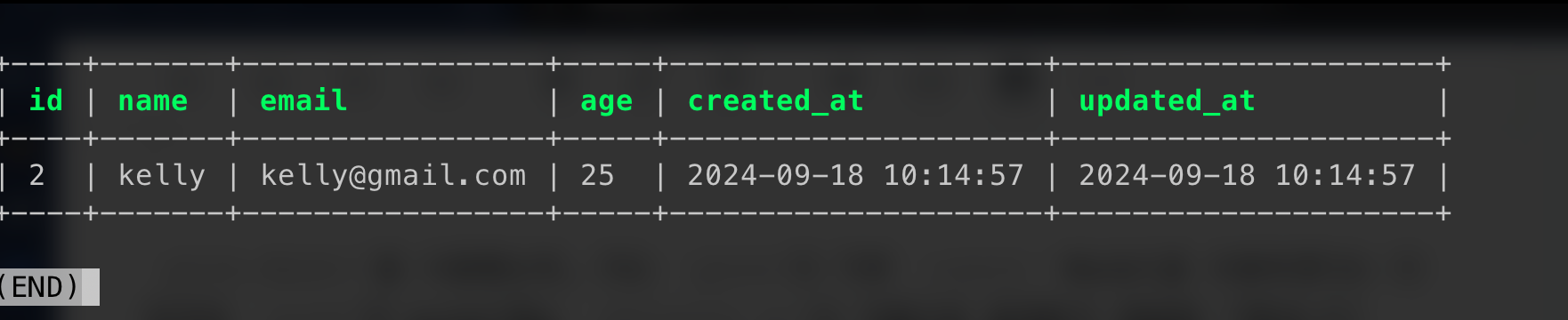
We can confirm that the data was inserted successfully.
As I continue studying Go, I’ll post what I learn step by step. Thank you.
>> Home