Server OS: Ubuntu 22.04
Kubernetes environment: Kubespray
Prometheus: kube-prometheus-stack v65.1.1
1. Overview
The etcd service itself was installed directly on the Kubernetes nodes (on the host, outside Pods), rather than running in a Pod; the Grafana etcd dashboard is only for viewing metrics. Because etcd runs outside the cluster’s Pod network, Prometheus did not have a scrape target for it by default. I added <etcd-server>:2379/metrics as a target, but scraping failed because Prometheus could not access etcd due to a TLS issue.
2. Check the etcd startup flags
Connect to the Kubernetes node where etcd is running and check the command with ps aux | grep etcd.
$ ps aux | grep etcd
root        9330  2.9  1.1 11494180 180124 ?     Ssl   2024 3132:04 /usr/local/bin/etcd
root       10329  4.7  6.3 2480192 1041808 ?     Ssl   2024 5166:20 kube-apiserver --advertise-address=<server ip> --allow-privileged=true --anonymous-auth=True --apiserver-count=3 --authorization-mode=Node,RBAC --bind-address=0.0.0.0 --client-ca-file=/etc/kubernetes/ssl/ca.crt --default-not-ready-toleration-seconds=300 --default-unreachable-toleration-seconds=300 --enable-admission-plugins=NodeRestriction --enable-aggregator-routing=False --enable-bootstrap-token-auth=true --endpoint-reconciler-type=lease --etcd-cafile=/etc/ssl/etcd/ssl/ca.pem --etcd-certfile=/etc/ssl/etcd/ssl/node-controlplane.pem --etcd-compaction-interval=5m0s --etcd-keyfile=/etc/ssl/etcd/ssl/node-controlplane-key.pem --etcd-servers=https://<etcd cluster ip1>:2379,https://<etcd cluster ip2>:2379,https://<etcd cluster ip3>:2379 --event-ttl=1h0m0s --kubelet-client-certificate=/etc/kubernetes/ssl/apiserver-kubelet-client.crt --kubelet-client-key=/etc/kubernetes/ssl/apiserver-kubelet-client.key --kubelet-preferred-address-types=InternalDNS,InternalIP,Hostname,ExternalDNS,ExternalIP --profiling=False --proxy-client-cert-file=/etc/kubernetes/ssl/front-proxy-client.crt --proxy-client-key-file=/etc/kubernetes/ssl/front-proxy-client.key --request-timeout=1m0s --requestheader-allowed-names=front-proxy-client --requestheader-client-ca-file=/etc/kubernetes/ssl/front-proxy-ca.crt --requestheader-extra-headers-prefix=X-Remote-Extra- --requestheader-group-headers=X-Remote-Group --requestheader-username-headers=X-Remote-User --secure-port=6443 --service-account-issuer=https://kubernetes.default.svc.cluster.local --service-account-key-file=/etc/kubernetes/ssl/sa.pub --service-account-lookup=True --service-account-signing-key-file=/etc/kubernetes/ssl/sa.key --service-cluster-ip-range=10.233.0.0/18 --service-node-port-range=30000-32767 --storage-backend=etcd3 --tls-cert-file=/etc/kubernetes/ssl/apiserver.crt --tls-private-key-file=/etc/kubernetes/ssl/apiserver.key
--etcd-cafile=/etc/ssl/etcd/ssl/ca.pem --etcd-certfile=/etc/ssl/etcd/ssl/node-controlplane.pem --etcd-keyfile=/etc/ssl/etcd/ssl/node-controlplane-key.pem
These are the certificate details required by etcd.
etcd already has an exporter implemented, so no separate exporter installation is needed.
curl --cacert /etc/ssl/etcd/ssl/ca.pem \
     --cert /etc/ssl/etcd/ssl/node-controlplane.pem \
     --key /etc/ssl/etcd/ssl/node-controlplane-key.pem \
     https://<etcd ip>:2379/metrics
Running the command above returns metrics.
3. Mount the certificate in Prometheus
3-1. Write the target
The existing Prometheus target configuration was managed with prometheus.prometheusSpec.additionalScrapeConfigsSecret (write a target file, create a Secret based on the file, then reference the Secret). Reference
First, write the target.
- job_name: kube-etcd
  scheme: https
  tls_config:
    ca_file: '/etc/prometheus/etcd-tls/ca.pem'
    cert_file: '/etc/prometheus/etcd-tls/cert.pem'
    key_file: '/etc/prometheus/etcd-tls/key.pem'
  static_configs:
    - targets:
      - <etcd ip>:2379
      - <etcd ip>:2379
      - <etcd ip>:2379
3-2. Create a Secret containing the certificates
kubectl create secret generic etcd-tls-secret \
--from-file=ca.pem=/etc/ssl/etcd/ssl/ca.pem \
--from-file=cert.pem=/etc/ssl/etcd/ssl/node-controlplane.pem \
--from-file=key.pem=/etc/ssl/etcd/ssl/node-controlplane-key.pem \
Create the Secret by referencing the files.
3-3. Mount the Prometheus volume
Mount the volume in the values for the kube-prometheus-stack Helm chart.
prometheus:
  prometheusSpec:
    volumes:
      - name: etcd-tls
        secret:
          secretName: etcd-tls-secret
    volumeMounts:
      - name: etcd-tls
        mountPath: /etc/prometheus/etcd-tls
        readOnly: true
After writing this, run helm upgrade.
4. Verify
Previously, the existing Grafana etcd dashboard showed No data everywhere, but
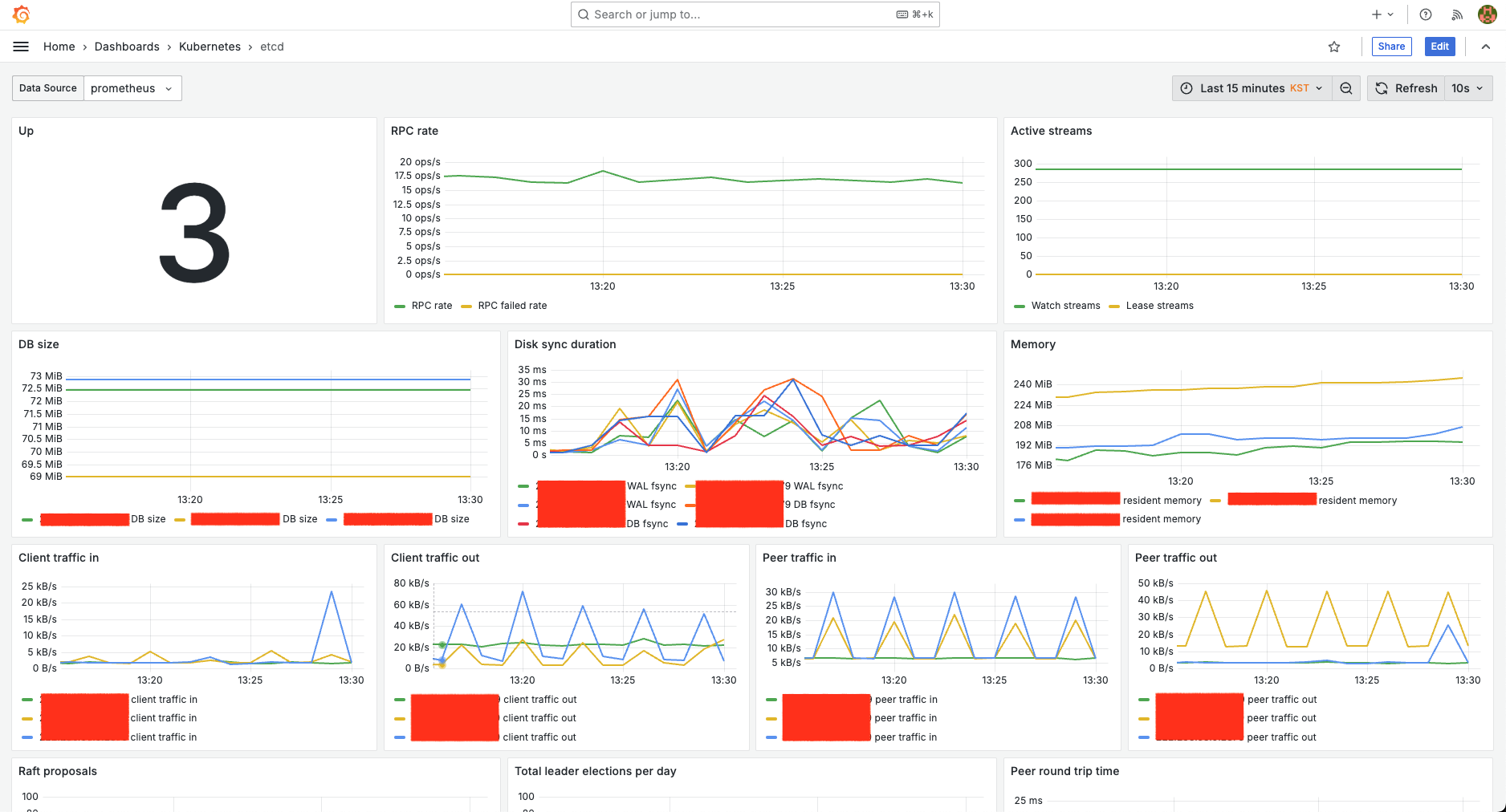
we can confirm that it now displays data correctly.
>> Home