Kubernetes Cluster Upgrade
Server: Vagrant VM (Ubuntu 22.04)
Current Kubeadm, Kubectl, Kubelet: 1.32.6
Kubeadm, Kubectl, Kubelet to upgrade: 1.33
Assuming the cluster is currently in production, I’ll perform the upgrade while a simple API server is running.
Kubernetes YAML, source code, Vagrantfile, etc.: GitHub
Current state
GET :8080/hello
method: GET
Response:
{
Message: Hello world!
}
GET :8080/bye
method: GET
Response:
{
Message: Bye world!
}
1. Control plane - Kubeadm
apt update
apt-cache madison kubeadm
If the command above only shows version 1.32.x, update the apt repository.
/etc/apt/sources.list.d/kubernetes.list
deb [signed-by=/etc/apt/keyrings/kubernetes-apt-keyring.gpg] https://pkgs.k8s.io/core:/stable:/v1.32/deb/ /
                                                                                               ^^ Change this part to 1.33
- Update the apt repository
apt-get update - Search for the version to upgrade to
apt-cache madison kubeadm
$ /etc/apt/sources.list.d# apt-cache madison kubeadm
   kubeadm | 1.33.2-1.1 | https://pkgs.k8s.io/core:/stable:/v1.33/deb  Packages
   kubeadm | 1.33.1-1.1 | https://pkgs.k8s.io/core:/stable:/v1.33/deb  Packages
   kubeadm | 1.33.0-1.1 | https://pkgs.k8s.io/core:/stable:/v1.33/deb  Packages
 apt-mark unhold kubeadm && \
 apt-get update && apt-get install -y kubeadm=1.33.2-1.1 && \
 apt-mark hold kubeadm
Check the upgrade plan.kubeadm upgrade plan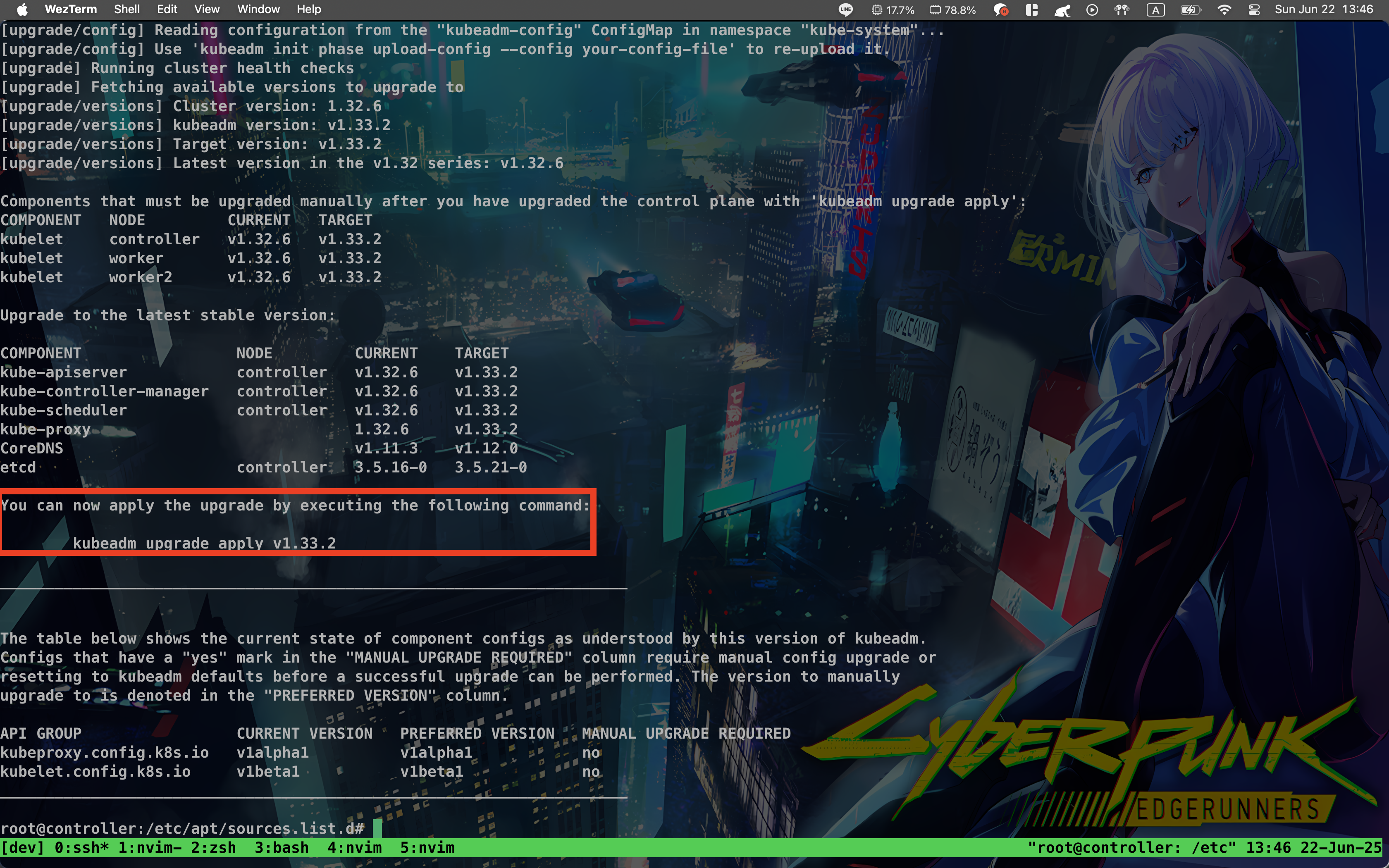 Run the commands shown in the image and wait for them to finish.
[upgrade] SUCCESS! A control plane node of your cluster was upgraded to "v1.33.2".

[upgrade] Now please proceed with upgrading the rest of the nodes by following the right order.
If you see a message like this, the upgrade has completed successfully.
In my case, I got context deadline exceeded, but after waiting it completed successfully.
2. Control plane - Kubectl, Kubelet
As with kubeadm, check the available versions in the apt repository and decide which version to upgrade to.
$ apt-cache madison kubectl
   kubectl | 1.33.2-1.1 | https://pkgs.k8s.io/core:/stable:/v1.33/deb  Packages
   kubectl | 1.33.1-1.1 | https://pkgs.k8s.io/core:/stable:/v1.33/deb  Packages
   kubectl | 1.33.0-1.1 | https://pkgs.k8s.io/core:/stable:/v1.33/deb  Packages
$ apt-cache madison kubelet
   kubelet | 1.33.2-1.1 | https://pkgs.k8s.io/core:/stable:/v1.33/deb  Packages
   kubelet | 1.33.1-1.1 | https://pkgs.k8s.io/core:/stable:/v1.33/deb  Packages
   kubelet | 1.33.0-1.1 | https://pkgs.k8s.io/core:/stable:/v1.33/deb  Packages
apt-mark unhold kubelet kubectl && \
apt-get update && apt-get install -y kubelet=1.33.2-1.1 kubectl=1.33.2-1.1 && \
apt-mark hold kubelet kubectl
After the command finishes, check the versions:
 The upgrade completed to version 1.33.2.
3. Worker - Drain
This is a test environment with one control plane and two worker nodes. In a real production environment, many Pods would be running across multiple nodes. Therefore, move the currently running Pods before upgrading.
The hello app is currently running on worker1. Drain worker1 to evict the running Pods from it.kubectl drain worker1 --ignore-daemonsets
 The node is cordoned, then the Pods are evicted.
- cordon: Marks a node as unschedulable. It does not evict currently running Pods.
- drain: Evicts the Pods running on the node.
 Before draining, it was running on worker1 (192.168.64.201).
 After draining, we can see it moved to the woker2 (192.168.64.202) node.
4. Worker - Kubeadm
Now that there are no Pods running on the node, upgrade it.
As with the control plane, update the apt repository and run the commands.
- kubeadm
apt-mark unhold kubelet kubectl && \
apt-get update && apt-get install -y kubelet=1.33.x-00 kubectl=1.33.x-00 && \
apt-mark hold kubelet kubectl
- kubectl, kubelet
apt-mark unhold kubelet kubectl && \
apt-get update && apt-get install -y kubelet=1.33.2-1.1 kubectl=1.33.2-1.1 && \
apt-mark hold kubelet kubectl
After upgrading the first node, use uncordon to make it schedulable again.
kubectl uncordon worker1
Repeat the process for the worker nodes.
5. Complete
After uncordoning the second node, the cluster upgrade is complete without stopping Pods during the process.
Check the versions:
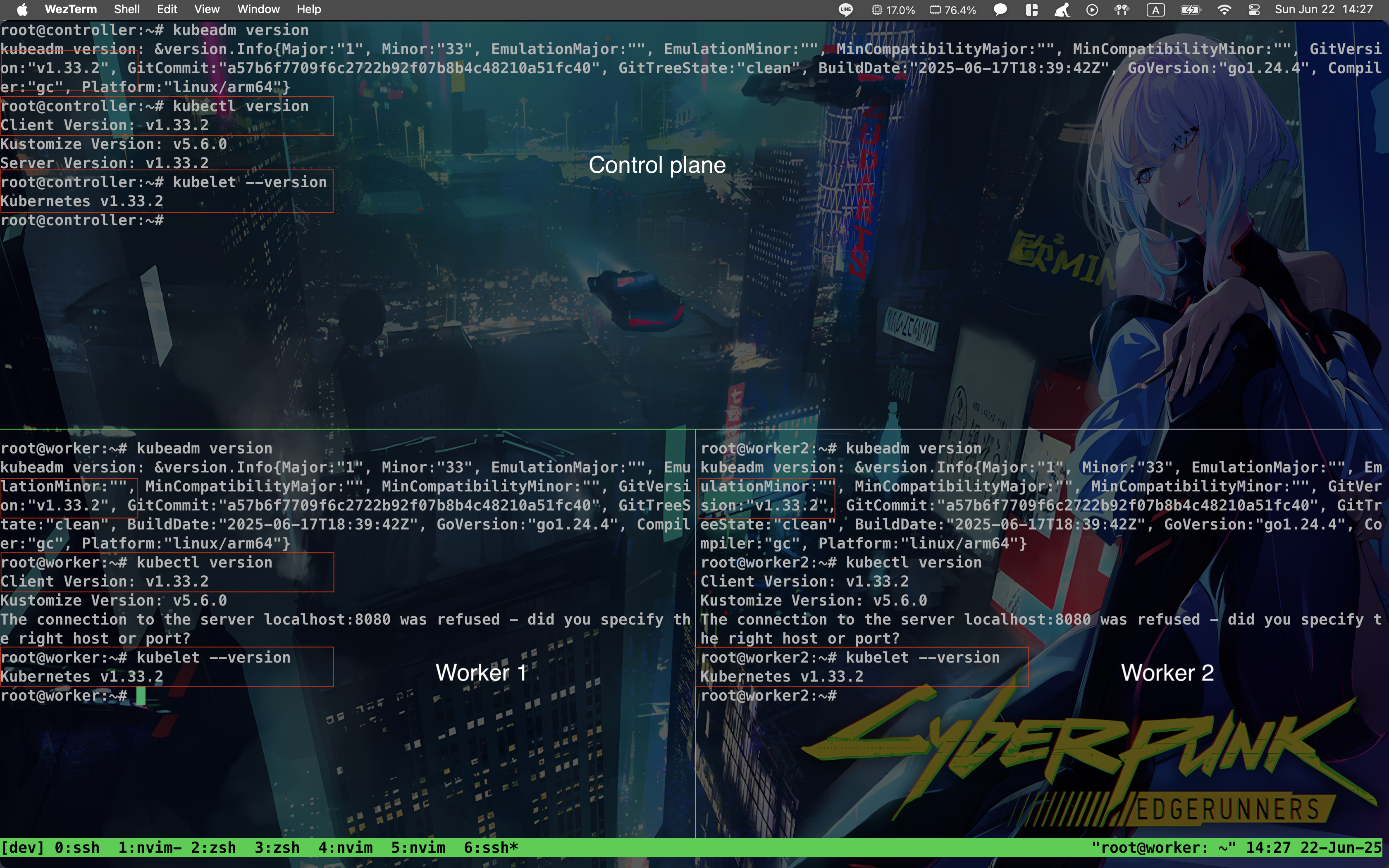
The cluster upgrade is now complete.
>> Home