The Problem
We encountered a runner disk space shortage while building Docker images in GitHub Actions. An image with a compressed size of 1.40GB failed twice with no space left on device in the same shared workflow, but at different points each time. At first, we thought the Dockerfile was too large or the cache had accumulated for too long. In this case, however, the cause was that a single image build result was being replicated into multiple storage locations.
This post explains where data is stored in the existing Buildx build-and-push flow, and how to remove the local Docker daemon copy by eliminating load: true.
Background
Instead of maintaining a separate CI/CD workflow in each service repository, we keep reusable workflows (workflow_call) and composite actions in a single shared workflow repository. Each service repository passes values such as the Dockerfile path, image name, and deployment environment; the shared workflow handles the build and push, manifest updates, and ArgoCD deployment.
# Service repository workflow
jobs:
  deploy:
    uses: <org>/workflows/.github/workflows/deploy.yml@v2
    with:
      image-name: my-service
      docker-file: ./Dockerfile
      stage: staging
With this setup, the Docker build method is defined in one place: the build action in the shared repository. That means disk usage issues during builds should be fixed once in the shared action rather than separately in each service. Conversely, structural issues in the shared action show up first in services with large images.
Existing Workflow Structure
The service repository calls a reusable workflow.
Service repository
  -> Call shared workflow (runs CI/CD)
  -> ci job
  -> docker/build
  -> docker/push
  -> ECR
  -> Update, commit, and push repository manifests
  -> ArgoCD deployment
The existing shared build action loads the image into the local Docker daemon, and a separate push action sends it to ECR.
- name: Build Docker image
  uses: docker/build-push-action@v7
  with:
    push: false
    load: true
    tags: ${{ inputs.tags }}
    cache-from: type=local,src=${{ runner.temp }}/.buildx-cache
    cache-to: type=local,dest=${{ runner.temp }}/.buildx-cache-new,mode=max

- name: Push Docker image
  run: docker push "$IMAGE_TAG"
The docker push command looks up the tag in the local Docker daemon. That is why this setup needed load: true. The problem is the cost of loading the image into the local daemon just to push it afterward.
Data Present Simultaneously During a Build
During a build that uses a cache, the final image and intermediate layers can coexist in multiple locations.
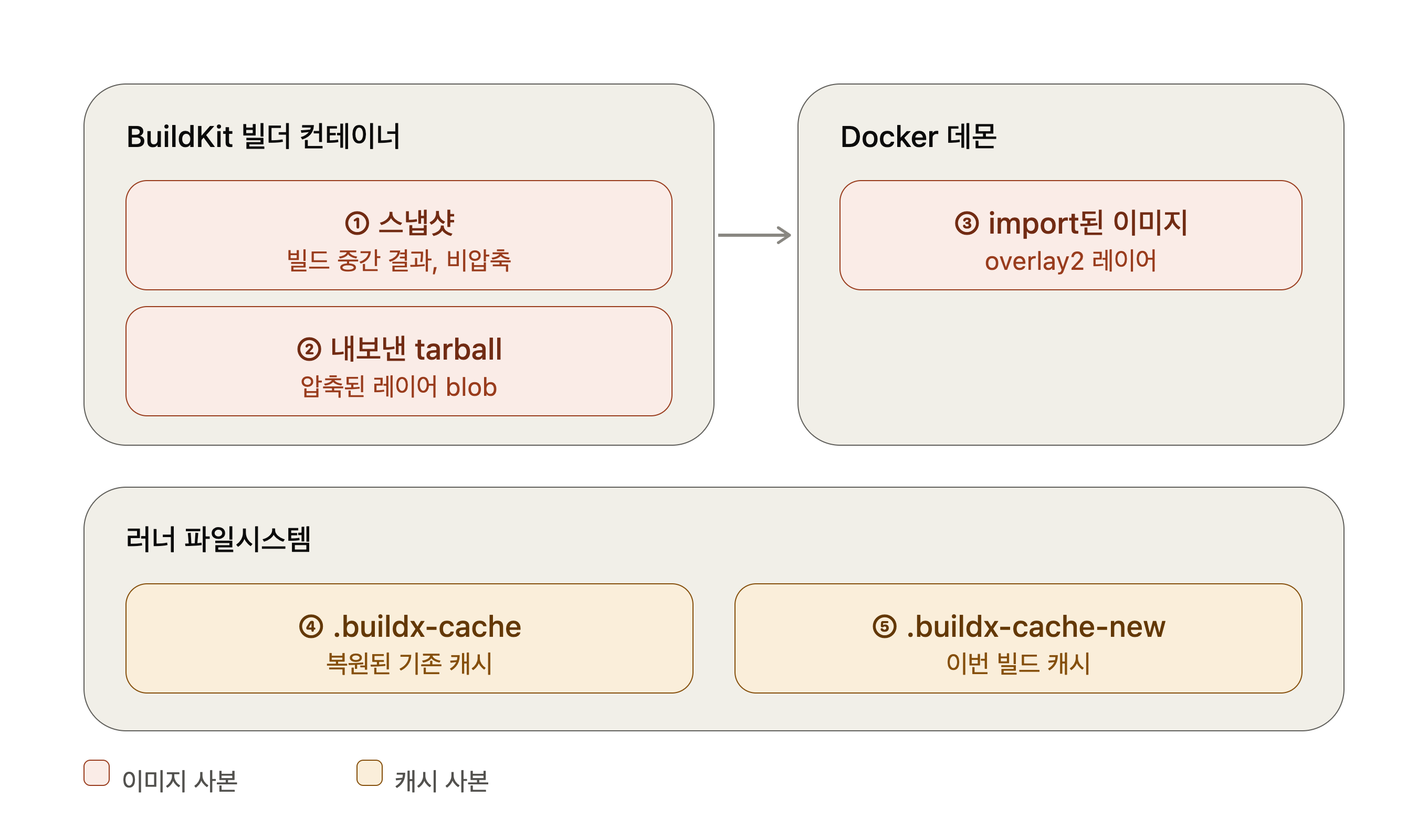
- The content store, snapshots, and build cache in the BuildKit builder container.
- The Docker image archive stream produced by
load: true. It is not a persistent copy unless saved as a separate file. - Image layers imported by the Docker daemon.
- The previous
.buildx-cachedirectory restored byactions/cache. - The new
.buildx-cache-newdirectory created withmode=max.
In particular, the local cache completes the new cache before removing the old one.
cache-from: type=local,src=${{ runner.temp }}/.buildx-cache
cache-to: type=local,dest=${{ runner.temp }}/.buildx-cache-new,mode=max

- name: Save Docker cache
  run: |
    rm -rf "${{ runner.temp }}/.buildx-cache"
    mv "${{ runner.temp }}/.buildx-cache-new" "${{ runner.temp }}/.buildx-cache"
As a result, the old and new caches coexist until cache export finishes. mode=max exports intermediate layers as well as the final layers, which can make the cache large.
Two image tags share the same layers, so the total layer data does not double. The key issue is not the number of tags, but the data held separately by BuildKit, the local Docker daemon, and the local cache.
The Two Actual Failure Points
Items 3 and 5 in the list above each corresponded to an actual failure. Builds of the same service with caching disabled and enabled ran out of disk space at different points.
The build with caching disabled (use-cache: false, no-cache: true) completed the build itself, but failed while the Docker daemon was importing a 1.39GB layer.
#20 loading layer 063b05006375 1.39GB / 1.39GB 84.6s done
#19 exporting to docker image format
#19 sending tarball 119.6s done
#20 ERROR: write /app/data/<large-file>: no space left on device
 > importing to docker:
The build with caching enabled failed while exporting the mode=max local cache to .buildx-cache-new.
#24 ERROR: error writing layer blob: failed to copy: failed to send write:
rpc error: code = Unknown desc = write /home/runner/work/_temp/.buildx-cache-new/ingest/6ccf6c85...: no space left on device
The first failure was caused by the daemon copy created by load: true, and the second by local cache export. Fixing only one would leave the other path failing. A service repository’s own workflow, changed to push the same Dockerfile directly with push: true in docker/build-push-action, built the same 1.40GB image without issue, so we decided to change the shared action in the same way.
Solution: Push Directly from BuildKit to ECR
docker/build-push-action can push directly to a registry. When BuildKit sends the image to ECR, there is no reason to import the image into the local Docker daemon.
The shared build action we ultimately implemented is shown below. Previously, there were two build steps depending on whether caching was enabled, and the no-cache step had no id, leaving the digest output empty. Combining the steps also resolved this issue.
inputs:
  use-cache:
    default: 'true'
  cache-scope:
    description: GitHub Actions cache scope; caching is disabled when empty
    default: ''
  push:
    description: Whether to push the built image or load it locally
    default: 'false'

- name: Build Docker image
  id: build
  uses: docker/build-push-action@v7
  with:
    context: ${{ inputs.context }}
    file: ${{ inputs.dockerfile }}
    tags: ${{ inputs.tags }}
    push: ${{ inputs.push == 'true' }}
    load: ${{ inputs.push != 'true' }}
    cache-from: ${{ inputs.use-cache == 'true' && inputs.cache-scope != '' && format('type=gha,scope={0}', inputs.cache-scope) || '' }}
    cache-to: ${{ inputs.use-cache == 'true' && inputs.cache-scope != '' && format('type=gha,mode=max,ignore-error=true,scope={0}', inputs.cache-scope) || '' }}
    no-cache: ${{ inputs.use-cache != 'true' || inputs.cache-scope == '' }}
    provenance: false
The CI workflow passes push: 'true' and an image-specific cache-scope to the build action.
- name: Build Docker image
  uses: <org>/workflows/.github/actions/docker/build@v2
  with:
    # Pass the existing context, Dockerfile, tags, and build args.
    use-cache: ${{ inputs.use-cache }}
    cache-scope: ${{ steps.vars.outputs.image-repository }}
    push: 'true'
We removed the separate docker push step from both reusable workflows. The reusable workflows’ inputs and outputs have not changed. Calling services still receive the image repository and tag as before and pass them to the ArgoCD deployment step. Repositories that call the build action directly still load the image into the local daemon as before, since the push default is false; if cache-scope is not set, the build runs without a cache.
We added provenance: false to prevent the default provenance attestation from being uploaded to ECR as a separate manifest list. If your environment needs to manage SBOMs or provenance in ECR, this value should be determined separately in accordance with your organization’s supply chain security policy.
Measuring the Cost of load Locally
The disk environment of an actual GitHub-hosted runner differs from Docker on macOS. However, we can use the same Dockerfile to check whether load: true adds the final image to Docker Engine and how large that image is.
We used a small Go application for the test. The Buildx builder was disk-test-load, running with the docker-container driver.
Build with --load
First, we built with --load.
➜ docker buildx build \
  --builder disk-test-load \
  --file ./go-app/Dockerfile \
  --tag local/go-app-disk-test:with-load \
  --load \
  ./go-app

[+] Building 15.9s (18/18) FINISHED
=> exporting to oci image format
=> => sending tarball
=> importing to docker
The last two lines are important. BuildKit sent a Docker image archive, and Docker Engine imported it. Next, we checked the size of the image in Docker Engine.
➜ docker image inspect local/go-app-disk-test:with-load \
  --format '{{.Size}} bytes'
8536017 bytes
In this test, the final image added to Docker Engine by --load was 8,536,017 bytes, or about 8.14 MiB.
Run the Same Build Without --load
We ran the same builder, Dockerfile, and build context, omitting only --load.
➜ docker buildx build \
  --builder disk-test-load \
  --file ./go-app/Dockerfile \
  --tag local/go-app-disk-test:without-load \
  ./go-app

[+] Building 0.4s (14/14) FINISHED
WARNING: No output specified with docker-container driver. Build result will only remain in the build cache. To push result image into registry use --push or to load image into docker use --load
--tag only assigns a name to the result. With a docker-container builder, one of --load, --push, or --output is needed to export the result from BuildKit. This run did not request an export, so the result remained only in the BuildKit cache.
➜ docker image inspect local/go-app-disk-test:without-load \
  --format '{{.Size}} bytes'

Error response from daemon: No such image: local/go-app-disk-test:without-load
This error does not indicate a failed build. docker image inspect queries only the Docker Engine image store, and it occurred because the second build did not import the image there.
Space Retained in BuildKit
BuildKit’s content store and snapshot cache remain even without --load. We checked them with the following command.
➜ docker buildx du --builder disk-test-load --verbose

95.56MB   mount / from exec /bin/sh -c go build -o main .
308.8MB   pulled from docker.io/library/golang:1.25-alpine
13.5MB    pulled from docker.io/library/alpine:latest
12.23MB   [stage-1 3/3] COPY --from=builder /app/main .

Reclaimable:  446.4MB
Total:        446.4MB
This 446.4MB is the total amount of cache and snapshots retained in the BuildKit builder. Reclaimable means it is eligible for BuildKit garbage collection, not that it has already been removed from disk.
Both builds reused the same builder cache. Therefore, this number is not the cost of --load alone; it is the BuildKit storage shared by both runs. The direct cost of --load is the 8,536,017 bytes added to Docker Engine.
| Storage area | Observed value | With --load omitted |
|---|---|---|
| BuildKit content store and snapshot cache | 446.4MB | Retained |
| Final image in Docker Engine | 8,536,017 bytes | Not created |
Reduce Cache Copies with type=gha
Removing load eliminates the Docker daemon copy. Moving the local cache to the GitHub Actions cache exporter can also eliminate the coexistence of the old and new caches on the runner filesystem.
cache-from: type=gha,scope=<image repository>
cache-to: type=gha,mode=max,ignore-error=true,scope=<image repository>
This configuration uses the cache API provided by the GitHub Actions runtime. Therefore, the behavior of type=gha cannot be validated in local Docker Desktop. Results measured on a GitHub-hosted runner, including the actual push path, are described below. BuildKit 0.20 or later is required; the BuildKit image downloaded by default by docker/setup-buildx-action meets this requirement.
The scope must be different for each image. The default scope is a single buildkit, so if two Dockerfiles are built in one repository, they overwrite each other’s cache. The service that failed also had a data Dockerfile and a server Dockerfile in one repository, so we used the ECR repository name as the scope. ignore-error=true ensures a build that has completed the image push does not fail just because cache export fails, for example due to a rate limit from the GitHub cache API.
The combination of type=local and actions/cache also put significant pressure on the repository’s Actions cache quota. Since the cache key includes the commit SHA, an entire cache tar is saved again with each commit. One repository had 15 entries of 650–816MB each, taking up 10.78GB and triggering eviction after exceeding the 10GB default quota; another repository had 216 entries of 199MB each, taking up 5.25GB. type=gha stores data by layer blob and does not upload unchanged blobs again. After switching, the same two repositories were down to 135 entries and 4.16GB, and 59 entries and 0.98GB, respectively.
mode=max helps cache hit rates but also stores intermediate layers. In the setup that saved an entire tar with each commit, mode=max quickly exhausted the quota. With type=gha, which deduplicates at the blob level, the pressure was greatly reduced, so we kept mode=max.
Before-and-After Comparison on GitHub-hosted Runners
Comparing only caches or building with type=cacheonly cannot validate the ECR push and Docker daemon loading costs. So we ran the original workflow’s local cache export + load: true + separate docker push and the updated workflow’s GHA cache export + load: false + direct BuildKit push on fresh runners. Both runs pushed images with unique tags to the existing test ECR repository, and we measured both the local cache save on the original path and the GHA cache export on the updated path.
Using the same source commit and Dockerfile, we generated a difficult-to-compress 1,024MiB payload with a fixed seed. The payload SHA-256 was 10ab0772c72b48db208f59c1e1d6fb915f7888727d8304c4141c2375b33c8657 in both runs, and the image size checked in ECR was 1,074,070,130 bytes for both. The runner image version was the same, 20260920.314.1 of ubuntu24. The cache scope differed between runs, and we compared only cold builds that generated the payload without a cache hit in the previous build step.
We recorded root filesystem usage from df -B1 at approximately one-second intervals, starting before Buildx setup and continuing until the build, push, cache export, and save were complete. The increase below is the maximum usage measured on each runner minus its usage at startup.
| Measurement | Before: local cache + Docker load | After: GHA cache + direct push |
|---|---|---|
| Root usage at startup | 62,568,120,320 bytes | 62,568,054,784 bytes |
| Sampled peak root usage | 72,590,290,944 bytes | 67,183,652,864 bytes |
| Maximum increase | 10,022,170,624 bytes | 4,615,598,080 bytes |
| Free space at peak usage | 4,280,086,528 bytes | 9,686,724,608 bytes |
| Runner local cache directory allocation | 2,166,247,424 bytes | 0 bytes |
| Test image in Docker daemon | Yes, logical size 1,073,741,824 bytes | None |
| BuildKit backing volume allocation | 4,371,144,704 bytes | 4,370,817,024 bytes |
The maximum increase fell from 10,022,170,624 bytes to 4,615,598,080 bytes. That is a reduction of 5,406,572,544 bytes (about 5.04 GiB), approximately 54%. The BuildKit backing volume remained at about 4.37GB in both cases. In contrast, after the change there was no runner local cache directory, and the test image was not present in the Docker daemon as reported by docker image inspect. We confirmed completion of local cache export and actions/cache save on the original path, and GHA cache export on the updated path.
However, the directory allocation and logical Docker image size in the table were measured in different ways, and the storage areas may overlap. These figures cannot be added together to calculate the individual causes of the 5.04GiB reduction. Sampling at roughly one-second intervals also cannot guarantee the actual instantaneous peak. GHA cache transfer after the change took 217.6 seconds, so lower disk usage does not mean a shorter cache export time.
These results compare a cold build using a 1,024MiB fixture and an actual ECR push. They do not demonstrate success for an actual service image or performance with a warm cache; the result for the failed 1.40GB image is covered in the next section.
Results After Applying the Change
We applied the change in the following order:
- Compared
--loadand--pushexperiments locally using the same Dockerfile and source commit. - Added
pushandcache-scopeinputs to the shared build action and combined the two separate build steps into one. - Removed separate
docker pushaction calls from both reusable workflows and passedpush: 'true'and an image-specificcache-scope. - Removed local cache restore and export and switched to
type=gha. - On a test repository branch, checked GitHub-hosted runner disk usage, ECR image tags and digests, and that a direct call without a scope builds without a cache.
- Confirmed that the reusable workflow inputs and outputs remained unchanged, then updated the
v2tag.
On the day the tag was updated, the service that had failed abandoned its own workflow and returned to the shared workflow (use-cache: "true"), and the same 1.40GB image succeeded. The action inputs in the build log were as follows, and the build finished with pushing layers 115.5s done without an importing to docker step.
push: true
load: false
cache-from: type=gha,scope=<registry>/<image>
cache-to: type=gha,mode=max,ignore-error=true,scope=<registry>/<image>
no-cache: false
provenance: false
Summary
Insufficient disk space during a Docker build is not simply a matter of the image being too large. You need to check how many copies of the image and cache are created during the build.
In this setup, removing load: true and having BuildKit push directly to ECR eliminates the Docker daemon copy. Then, using type=gha also removes from the runner filesystem the two cache directories created during local cache replacement. Since the two failures occurred at different points, fixing only one would have left the other path failing.
By recording measurements, you can make decisions about CI runner size and cache policy based on the actual space used by BuildKit, the Docker daemon, and the cache exporter, rather than looking only at image size.
>> Home